TOP NEWS

Lorem ipsum dolor sit amet, consectetur adipiscing elit. Maecenas mattis nisi felis, vel ullamcorper dolor. Integer iaculis nisi id nisl porta vestibulum.

Selasa, 04 Agustus 2009

Acara Kita Semua (STIKOM Night)

Segala puja dan puji syukur kehadirat Allah SWT.
Yang telah memberikan begitu banyak nikmat kepada kita semua.

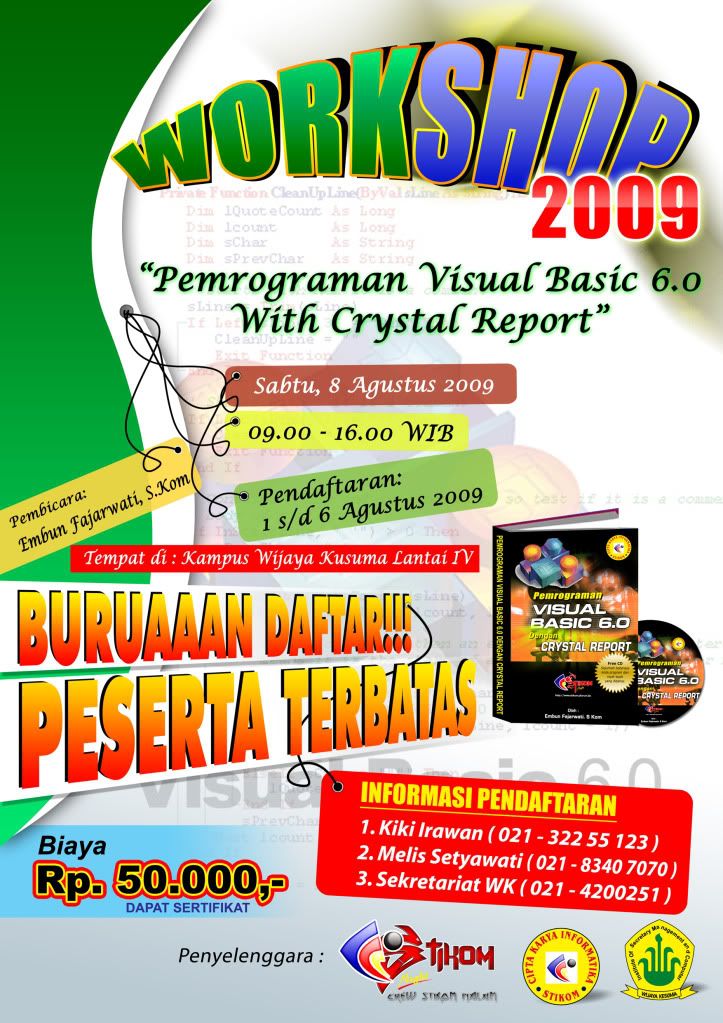
Alhamdulillah, Pada hari ini; Sabtu, 8 Agustus 2009
Kita telah menyelesaikan Workshop dengan Materi

"Pemrograman Visual Basic 6 with Crystal Report"

Yang diisi oleh : Embun Fajarwati, S.Kom

Berkat dukungan dan kerjasama teman-teman, Alhamdulillah Workshop Visual Basic 6 ini telah kita laksanakan dan telah berjalan dengan lancar.
Photobucket

Sekali lagi saya mengucapkan terima kasih banyak kepada teman2 yang telah mensukseskan acara workshop ini.


SELAIN KITA MENYELESAIKAN PROYEK YANG TERAKHIR KITA YAITU
"MEMBUAT WORKSHOP BERBASIS TEKNOLOGI INFORMASI"

Sebelumnya :

Kita sudah menyelesaikan beberapa proyek :

Yaitu :
- Membuat Sarana Diskusi dunia maya yaitu dengan membuat Forum Stikom Night
- Membuat program belajar hari senin :
Dimana program belajar hari senin ini kita isi dengan berbagai Metode Pembelajaran
Baik dari Materi Kampus maupun Materi2 yang sedang Tren pada saat ini.

www.stikom.pforum.biz

Terima Kasih atas partisipasi dari teman2 sehingga acara demi acara dapat kita selesaikan dengan baik dan berjalan dengan lancar.

Bagi Teman-teman yang ingin ikut program belajar hari senin.
Bisa datang langsung ke kampus STIKOM CKI Cabang Cempaka Putih
dan Setelah Teman2 kumpul, kita akan menuju tempat experimen yaitu di :
Gedung Yayasan Perguruan Ksatrya.

Posted by Irawanqq 0

Minggu, 02 Agustus 2009

Simbah & Irawanqq Award: Jabat Erat Temanku

PhotobucketPhotobucket

Ternyata kegiatan blog 'jauh' lebih menyenangkan dari yang saya duga. Mendapat kepuasan karena bisa mempublikasikan pengetahuan kita dan puas lagi saat melihat 'hit counter' bertambah terus hari demi hari. Belum lagi mendapatkan 'super' sahabat yang tiada matinya. Rela meluangkan waktu untuk sekedar berkunjung dan memberi komentar pada artikel saya yang masih belum berkelas. Nah. makasih banget sobat semua. Sebagai tanda cinta saya, saya akan membagikan "Simbah & Irawanqq Award: Jabat Erat Temanku" (Copas Mas Doyok)


Dan award jabat tangan ini diberikan kepada sobat2 yang gemar mengunjungi blog ku:
1. Celebryti
2. Osi-blog
3. Narti
4. James William
5. Nen's
6. ubanzholic
7. Jalani Hidup Apa Adanya
8. Hamster Land
9. Rachmat
10. Reza

Nah, itulah sobat sobat yang berhak dapet award, nah bagi penerima award diambil yah dan segera bagikan ke sepuluh temanmu yang lain yang belum kebagian ...

Tapi sebelum membagikan Ke teman2-Mu Nama dibawah ini harus kamu cantumkan :
--> Irawanqq
--> Simbah Doyok

Terima kasih banget selama ini sobat adalah sahabat yang sangat istimewa. Hidup Blogger Indonesia!
Posted by Irawanqq 24

Jumat, 31 Juli 2009

Tema Apple Theme for XP


Apple Theme for XP

Download Code :
http://www.ziddu.com/download/7556406/AppleThemeforXP.txt.html


Posted by Irawanqq 10

Software Remove Master v5.0.1.3


Remove the Remains of Uninstalled Application
Uninstalling a program means removing a program from your computer and also removing its components completely. To uninstall a program may remove all program files and components by easy and fast Way, however, some ordinary uninstall tools leave unused files and registry keys after you uninstall a software. So you need Software Remove Master to monitor uninstall process and to remove unneeded files and registry keys completely.


Software Remove Master automatically detects broken registry keys from you Add/Remove list, and clears them completely according to your order. Software Remove Master can also detect unused files left by previous uninstall operations - it will prompt you before it completely deletes these files. Even a single drag-drop performs an uninstall process! Software Remove Master processes come with step-by-step instructions and can be performed with a few simple clicks or drag-drops.[/b]

Features

View the all installed program in the list


Software Remove Master Free Version provides real-time detailed information about the installed programs.

View all details of a certain application installed on your computer.
Quickly open programs install folder, company site or support site.
Display programs in 3 different views (Icons, List and Details)
List all installed programs, system updates and screen savers quickly

Uninstall a program completely
Completely takes the place of Windows Add/Remove program which can't uninstall the programs completely.
It will not show the program in the program list as soon as the program is uninstalled
Software Remove Master scans deeply into your computer.
Remove the files, folders, registry entries that were left in your computer.

Operate in the Startup Item
Add a program in Startup item, there are four different ways of starting up the program for you
Startup FolderCurrent User
Startup FolderAll User
RegistryCurrent UserRun
RegistryAll UserRun
Set the item to run or forbid as the computer start up.
Select an item and Scan the item information including the publisher, version and description, which will be displayed on the left panel of the main area.

Operate in the Program List
Backup the registry info of all installed program.
Add the comments for selected program in the registry.
Export any program uninstall information to reg file.
Clean up remnants program files and reg keys after uninstalling.
Ability to uninstall screen savers.
Create a full report for the installed programs and save the report to a text file.

Easy to use
Designed for both beginners and advanced users.
Switch over among the interfaces of this software.
Achieve your order availably with simple clicks.

Download Code
http://rapidshare.com/files/262141599/S.R.M_5.0.1.3_XLR8.rar


Posted by Irawanqq 0
Mohon Maaf Blog ini sekarang sudah jarang di Update
Kalau link atau isi kontentnya sudah pada expired